
Support Questions
- Cloudera Community
- Support
- Support Questions
- Re: how to force name node to be active
- Subscribe to RSS Feed
- Mark Question as New
- Mark Question as Read
- Float this Question for Current User
- Bookmark
- Subscribe
- Mute
- Printer Friendly Page
- Subscribe to RSS Feed
- Mark Question as New
- Mark Question as Read
- Float this Question for Current User
- Bookmark
- Subscribe
- Mute
- Printer Friendly Page
how to force name node to be active
- Labels:
-
Apache Ambari
-
Apache Hadoop


Created on 12-04-2017 11:10 AM - edited 08-17-2019 08:09 PM
- Mark as New
- Bookmark
- Subscribe
- Mute
- Subscribe to RSS Feed
- Permalink
- Report Inappropriate Content
in our ambari cluster both name node are like standby
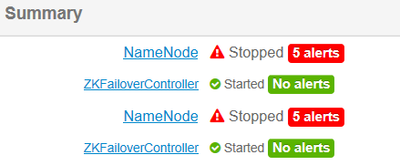
in order to force one of them to be active we do
 hdfs haadmin -transitionToActive --forceactive master01

Illegal argument: Unable to determine service address for namenode 'master01'
but we get - Unable to determine service address
what this is indicate ? and how to fix this issue ?
Created 12-04-2017 10:57 PM
- Mark as New
- Bookmark
- Subscribe
- Mute
- Subscribe to RSS Feed
- Permalink
- Report Inappropriate Content
what we can do next in order to start one of the standby as active ?
Created on 12-04-2017 11:00 PM - edited 08-17-2019 08:08 PM
- Mark as New
- Bookmark
- Subscribe
- Mute
- Subscribe to RSS Feed
- Permalink
- Report Inappropriate Content
after 2 min we get that:

Created on 12-04-2017 11:11 PM - edited 08-17-2019 08:08 PM
- Mark as New
- Bookmark
- Subscribe
- Mute
- Subscribe to RSS Feed
- Permalink
- Report Inappropriate Content
and now ( after 15 min we get )
I not start anything second namenode became standby



Created 12-04-2017 11:11 PM
- Mark as New
- Bookmark
- Subscribe
- Mute
- Subscribe to RSS Feed
- Permalink
- Report Inappropriate Content
Can you validate the entry was created.
[zk: localhost:2181(CONNECTED) 1] ls /hadoop-ha/hdfsha
Check lock
[zk: localhost:2181(CONNECTED) 2] get /hadoop-ha/hdfsha/ActiveStandbyElectorLock
Check the status
$ hdfs haadmin -getServiceState namenode1
$ hdfs haadmin -getServiceState namenode2
Try to failover
$ hdfs haadmin -failover
Use the below to force one to Active
$ hdfs haadmin -transitionToActive <serviceId> --forceactive
or
$ hdfs haadmin -transitionToStandby <serviceId>
Hope that helps
Created 12-04-2017 11:13 PM
- Mark as New
- Bookmark
- Subscribe
- Mute
- Subscribe to RSS Feed
- Permalink
- Report Inappropriate Content
[zk: localhost:2181(CONNECTED) 14] ls /hadoop-ha/hdfsha
[
ActiveBreadCrumb]
[zk: localhost:2181(CONNECTED) 15]
Created 12-04-2017 11:15 PM
- Mark as New
- Bookmark
- Subscribe
- Mute
- Subscribe to RSS Feed
- Permalink
- Report Inappropriate Content
get  /hadoop-ha/hdfsha/ActiveBreadCrumb


hdfshann2master03.sys54.com �>(�>
cZxid = 0xce70000039b
ctime = Mon Dec 04 22:40:18 UTC 2017
mZxid = 0xce700000447
mtime = Mon Dec 04 23:06:32 UTC 2017
pZxid = 0xce70000039b
cversion = 0
dataVersion = 4
aclVersion = 0
ephemeralOwner = 0x0
dataLength = 42
numChildren = 0


<br>
Created 12-04-2017 11:18 PM
- Mark as New
- Bookmark
- Subscribe
- Mute
- Subscribe to RSS Feed
- Permalink
- Report Inappropriate Content
[root@master01 hdfs]# hdfs haadmin -getServiceState master02
Illegal argument: Unable to determine service address for namenode 'master02'
[root@master01 hdfs]# hdfs haadmin -getServiceState master03
Illegal argument: Unable to determine service address for namenode 'master03'
Created 12-04-2017 11:21 PM
- Mark as New
- Bookmark
- Subscribe
- Mute
- Subscribe to RSS Feed
- Permalink
- Report Inappropriate Content
hdfs haadmin -transitionToActive master01 --forceactiv
transitionToActive:
incorrect arguments Usage: haadmin [-transitionToActive [--forceactive] <serviceId>]
Created 12-04-2017 11:13 PM
- Mark as New
- Bookmark
- Subscribe
- Mute
- Subscribe to RSS Feed
- Permalink
- Report Inappropriate Content
Election issue !
Created 12-04-2017 11:22 PM
- Mark as New
- Bookmark
- Subscribe
- Mute
- Subscribe to RSS Feed
- Permalink
- Report Inappropriate Content
@Geoffrey - what you mean ?


