
Our Community is getting an upgrade! To get everything ready for the relaunch, we’ll be placing the site in read-only mode starting September 21st.
We really appreciate your understanding while we get things set up behind the scenes. Catch up on all the exciting details about the move here.
Need help or have questions? Drop us a line at [email protected]

Community Articles
 Hi, I'm CLEO! Something exciting is coming to the Community. Stay Tuned!
- Cloudera Community
- Support
- Community Articles
- Ambari Views REST API Overview
- Subscribe to RSS Feed
- Mark as New
- Mark as Read
- Bookmark
- Subscribe
- Printer Friendly Page
- Report Inappropriate Content
- Subscribe to RSS Feed
- Mark as New
- Mark as Read
- Bookmark
- Subscribe
- Printer Friendly Page
- Report Inappropriate Content


Created on 12-16-2016 02:27 PM
For the Devops crowd, you can take it a step further and automate provisioning of Ambari server. For that consider using community contributions like https://supermarket.chef.io/cookbooks/ambari if you were to use Chef, for example. For an exhaustive tour of the REST API, consult the docs https://github.com/apache/ambari/blob/trunk/ambari-views/docs/index.md
This recipe assumes you have an unsecured HDP cluster with Namenode HA. Tested on Ambari 2.4.2.
# list all available views for the current version of Ambari
curl --user admin:admin -i -H 'X-Requested-By: ambari' -X GET http://localhost:8080/api/v1/views/
# get Files View only
curl --user admin:admin -i -H 'X-Requested-By: ambari' -X GET http://localhost:8080/api/v1/views/FILES
# get all versions of Files View for the current Ambari release
curl --user admin:admin -i -H 'X-Requested-By: ambari' -X GET http://localhost:8080/api/v1/views/FILES/versions
# get specific version of FILES view
curl --user admin:admin -i -H 'X-Requested-By: ambari' -X GET http://localhost:8080/api/v1/views/FILES/versions/1.0.0
# create an instance of FILES view
curl --user admin:admin -i -H 'X-Requested-By: ambari' -X POST http://localhost:8080/api/v1/views/FILES/versions/1.0.0/instances/FILES_NEW_INSTANCE
# delete an instance of FILES view
curl --user admin:admin -i -H 'X-Requested-By: ambari' -X DELETE http://localhost:8080/api/v1/views/FILES/versions/1.0.0/instances/FILES_NEW_INSTANCE
# get specific instance of FILES view
curl --user admin:admin -i -H 'X-Requested-By: ambari' -X GET http://localhost:8080/api/v1/views/FILES/versions/1.0.0/instances/FILES_NEW_INSTANCE
# create a Files view instance with properties
curl --user admin:admin -i -H 'X-Requested-By: ambari' -X POST http://localhost:8080/api/v1/views/FILES/versions/1.0.0/instances/FILES_NEW_INSTANCE \
--data '{
  "ViewInstanceInfo" : {
      "description" : "Files API",
      "label" : "Files View",
      "properties" : {
      "webhdfs.client.failover.proxy.provider" : "org.apache.hadoop.hdfs.server.namenode.ha.ConfiguredFailoverProxyProvider",
      "webhdfs.ha.namenode.http-address.nn1" : "u1201.ambari.apache.org:50070",
      "webhdfs.ha.namenode.http-address.nn2" : "u1201.ambari.apache.org:50070",
      "webhdfs.ha.namenode.https-address.nn1" : "u1201.ambari.apache.org:50470",
      "webhdfs.ha.namenode.https-address.nn2" : "u1202.ambari.apache.org:50470",
      "webhdfs.ha.namenode.rpc-address.nn1" : "u1201.ambari.apache.org:8020",
      "webhdfs.ha.namenode.rpc-address.nn2" : "u1202.ambari.apache.org:8020",
      "webhdfs.ha.namenodes.list" : "nn1,nn2",
      "webhdfs.nameservices" : "hacluster",
      "webhdfs.url" : "webhdfs://hacluster"
      }
    }
}'
# create/update a Files view new/existing instance with new properties
curl --user admin:admin -i -H 'X-Requested-By: ambari' -X PUT http://localhost:8080/api/v1/views/FILES/versions/1.0.0/instances/FILES_NEW_INSTANCE \
--data '{
  "ViewInstanceInfo" : {
      "description" : "Files API",
      "label" : "Files View",
      "properties" : {
      "webhdfs.client.failover.proxy.provider" : "org.apache.hadoop.hdfs.server.namenode.ha.ConfiguredFailoverProxyProvider",
      "webhdfs.ha.namenode.http-address.nn1" : "u1201.ambari.apache.org:50070",
      "webhdfs.ha.namenode.http-address.nn2" : "u1201.ambari.apache.org:50070",
      "webhdfs.ha.namenode.https-address.nn1" : "u1201.ambari.apache.org:50470",
      "webhdfs.ha.namenode.https-address.nn2" : "u1202.ambari.apache.org:50470",
      "webhdfs.ha.namenode.rpc-address.nn1" : "u1201.ambari.apache.org:8020",
      "webhdfs.ha.namenode.rpc-address.nn2" : "u1202.ambari.apache.org:8020",
      "webhdfs.ha.namenodes.list" : "nn1,nn2",
      "webhdfs.nameservices" : "hacluster",
      "webhdfs.url" : "webhdfs://hacluster"
      }
    }
}'
# create instance of Hive view
curl --user admin:admin -i -H 'X-Requested-By: ambari' -X POST http://localhost:8080/api/v1/views/HIVE/versions/1.0.0/instances/HIVE_NEW_INSTANCE \
--data '{
  "ViewInstanceInfo" : {
      "description" : "Hive View",
      "label" : "Hive View",
      "properties" : {
      "webhdfs.client.failover.proxy.provider" : "org.apache.hadoop.hdfs.server.namenode.ha.ConfiguredFailoverProxyProvider",
      "webhdfs.ha.namenode.http-address.nn1" : "u1201.ambari.apache.org:50070",
      "webhdfs.ha.namenode.http-address.nn2" : "u1201.ambari.apache.org:50070",
      "webhdfs.ha.namenode.https-address.nn1" : "u1201.ambari.apache.org:50470",
      "webhdfs.ha.namenode.https-address.nn2" : "u1202.ambari.apache.org:50470",
      "webhdfs.ha.namenode.rpc-address.nn1" : "u1201.ambari.apache.org:8020",
      "webhdfs.ha.namenode.rpc-address.nn2" : "u1202.ambari.apache.org:8020",
      "webhdfs.ha.namenodes.list" : "nn1,nn2",
      "webhdfs.nameservices" : "hacluster",
      "webhdfs.url" : "webhdfs://hacluster",
      "hive.host" : "u1203.ambari.apache.org",
      "hive.http.path" : "cliservice",
      "hive.http.port" : "10001",
      "hive.metastore.warehouse.dir" : "/apps/hive/warehouse",
      "hive.port" : "10000",
      "hive.transport.mode" : "binary",
      "yarn.ats.url" : "http://u1202.ambari.apache.org:8188",
      "yarn.resourcemanager.url" : "u1202.ambari.apache.org:8088"
      }
    }
}'
# interact with a FILES view instance
curl --user admin:admin -i -H 'X-Requested-By: ambari' -X GET http://localhost:8080/api/v1/views/FILES/versions/1.0.0/instances/FILES_NEW_INSTANCE/resources/files...
# once you create an instance, you can see its current properties
curl --user admin:admin -i -H 'X-Requested-By: ambari' -X GET http://localhost:8080/api/v1/
iews/FILES/versions/1.0.0/
# output of previous command
{
  "href" : "http://localhost:8080/api/v1/views/FILES/versions/1.0.0/",
  "ViewVersionInfo" : {
    "archive" : "/var/lib/ambari-server/resources/views/work/FILES{1.0.0}",
    "build_number" : "161",
    "cluster_configurable" : true,
    "description" : null,
    "label" : "Files",
    "masker_class" : null,
    "max_ambari_version" : null,
    "min_ambari_version" : "2.0.*",
    "parameters" : [
      {
        "name" : "webhdfs.url",
        "description" : "Enter the WebHDFS FileSystem URI. Typically this is the dfs.namenode.http-address\n
          property in the hdfs-site.xml configuration. URL must be accessible from Ambari Server.",
        "label" : "WebHDFS FileSystem URI",
        "placeholder" : null,
        "defaultValue" : null,
        "clusterConfig" : "core-site/fs.defaultFS",
        "required" : true,
        "masked" : false
      },
      {
        "name" : "webhdfs.nameservices",
        "description" : "Comma-separated list of nameservices. Value of hdfs-site/dfs.nameservices property",
        "label" : "Logical name of the NameNode cluster",
        "placeholder" : null,
        "defaultValue" : null,
        "clusterConfig" : "hdfs-site/dfs.nameservices",
        "required" : false,
        "masked" : false
      },
      {
        "name" : "webhdfs.ha.namenodes.list",
        "description" : "Comma-separated list of namenodes for a given nameservice.\n            Value of hdfs
-site/dfs.ha.namenodes.[nameservice] property",
        "label" : "List of NameNodes",
        "placeholder" : null,
        "defaultValue" : null,
        "clusterConfig" : "fake",
        "required" : false,
        "masked" : false
      },
      {
        "name" : "webhdfs.ha.namenode.rpc-address.nn1",
        "description" : "RPC address for first name node.\n            Value of hdfs-site/dfs.namenode.rpc-add
ress.[nameservice].[namenode1] property",
        "label" : "First NameNode RPC Address",
        "placeholder" : null,
        "defaultValue" : null,
        "clusterConfig" : "fake",
        "required" : false,
        "masked" : false
      },
      {
        "name" : "webhdfs.ha.namenode.rpc-address.nn2",
        "description" : "RPC address for second name node.\n            Value of hdfs-site/dfs.namenode.rpc-ad
dress.[nameservice].[namenode2] property",
        "label" : "Second NameNode RPC Address",
        "placeholder" : null,
        "defaultValue" : null,
        "clusterConfig" : "fake",
        "required" : false,
        "masked" : false
      },
      {
        "name" : "webhdfs.ha.namenode.http-address.nn1",
        "description" : "WebHDFS address for first name node.\n            Value of hdfs-site/dfs.namenode.htt
p-address.[nameservice].[namenode1] property",
        "label" : "First NameNode HTTP (WebHDFS) Address",
        "placeholder" : null,
        "defaultValue" : null,
        "clusterConfig" : "fake",
        "required" : false,
        "masked" : false
      },
      {
        "name" : "webhdfs.ha.namenode.http-address.nn2",
        "description" : "WebHDFS address for second name node.\n            Value of hdfs-site/dfs.namenode.ht
tp-address.[nameservice].[namenode2] property",
        "label" : "Second NameNode HTTP (WebHDFS) Address",
        "placeholder" : null,
        "defaultValue" : null,
        "clusterConfig" : "fake",
        "required" : false,
        "masked" : false
      },
      {
        "name" : "webhdfs.client.failover.proxy.provider",
        "description" : "The Java class that HDFS clients use to contact the Active NameNode\n            Valu
e of hdfs-site/dfs.client.failover.proxy.provider.[nameservice] property",
        "label" : "Failover Proxy Provider",
        "placeholder" : null,
        "defaultValue" : null,
        "clusterConfig" : "fake",
        "required" : false,
        "masked" : false
      },
      {
        "name" : "hdfs.auth_to_local",
        "description" : "Auth to Local Configuration",
        "label" : "Auth To Local",
        "placeholder" : null,
        "defaultValue" : null,
        "clusterConfig" : "core-site/hadoop.security.auth_to_local",
        "required" : false,
        "masked" : false
      },
      {
        "name" : "webhdfs.username",
        "description" : "doAs for proxy user for HDFS. By default, uses the currently logged-in Ambari user.",
        "label" : "WebHDFS Username",
        "placeholder" : null,
        "defaultValue" : "${username}",
        "clusterConfig" : null,
        "required" : false,
        "masked" : false
      },
      {
        "name" : "webhdfs.auth",
        "description" : "Semicolon-separated authentication configs.",
        "label" : "WebHDFS Authorization",
        "placeholder" : "auth=SIMPLE",
        "defaultValue" : null,
        "clusterConfig" : null,
        "required" : false,
        "masked" : false
      }
    ],
    "status" : "DEPLOYED",
    "status_detail" : "Deployed /var/lib/ambari-server/resources/views/work/FILES{1.0.0}.",
    "system" : false,
    "version" : "1.0.0",
    "view_name" : "FILES"
  },
  "permissions" : [
    {
      "href" : "http://localhost:8080/api/v1/views/FILES/versions/1.0.0/permissions/4",
      "PermissionInfo" : {
        "permission_id" : 4,
        "version" : "1.0.0",
        "view_name" : "FILES"
      }
    }
  ],
  "instances" : [
    {
      "href" : "http://localhost:8080/api/v1/views/FILES/versions/1.0.0/instances/Files",
      "ViewInstanceInfo" : {
        "instance_name" : "Files",
        "version" : "1.0.0",
        "view_name" : "FILES"
      }
    }
  ]


Created on 01-06-2017 12:04 AM - edited 08-17-2019 07:22 AM
- Mark as Read
- Mark as New
- Bookmark
- Permalink
- Report Inappropriate Content
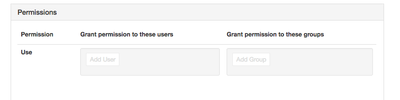
@Artem Ervits Could you add an example to modify Permissions to a View via Rest API Interface.
Created on 01-06-2017 04:51 PM
- Mark as Read
- Mark as New
- Bookmark
- Permalink
- Report Inappropriate Content
that's a great suggestion, it was on my follow up list as when you provision a new user and/or new view, permissions need to be added. Will follow up with that suggestion soon.
Created on 01-11-2017 07:11 PM
- Mark as Read
- Mark as New
- Bookmark
- Permalink
- Report Inappropriate Content
@Saumil Mayani please confirm the steps to add user/group described in this thread https://community.hortonworks.com/questions/50073/adding-new-ambari-user-with-assigned-group-with-ap... work.


Created on 12-11-2017 03:50 PM
- Mark as Read
- Mark as New
- Bookmark
- Permalink
- Report Inappropriate Content
what should be the url/command when we need to access hadoop jobs for a specified time duration ?


| User | Count |
|---|---|
| 4 | |
| 4 | |
| 2 | |
| 2 | |
| 1 |


