Our Community is getting an upgrade! To get everything ready for the relaunch, we’ll be placing the site in read-only mode starting September 21st.
We really appreciate your understanding while we get things set up behind the scenes. Catch up on all the exciting details about the move here.
Need help or have questions? Drop us a line at [email protected]

Community Articles

Find and share helpful community-sourced technical articles.
Announcements
Share your experience with Cloudera on G2 and get a $25 Amazon Gift card.
Hi, I'm CLEO! Something exciting is coming to the Community. Stay Tuned!

Labels (2)
avatar
Master Guru

What: Executing Scala Apache Spark Code in JARS from Apache NiFi

Why: You don't want all of your scala code in a continuous block like Apache Zeppelin

Tools: Apache NiFi - Apache Livy - Apache Spark - Scala

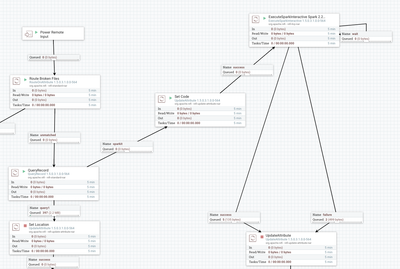
Flows:

62928-nifiscalaflow.png

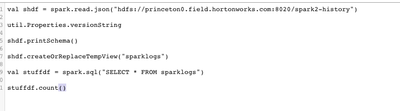
Option 1: Inline Scala Code

62917-scalacodeinline.png

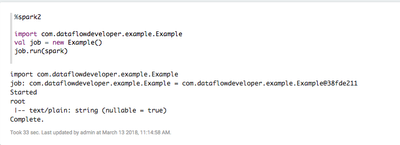
Apache Zeppelin Running the Same Scala Job (have to add the jar to interpreter for Spark and restart)

62918-zeppelinsparkscalajar.png

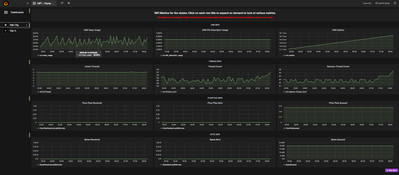
Grafana Charts of Apache NiFi Run

62919-nifigrafana.png

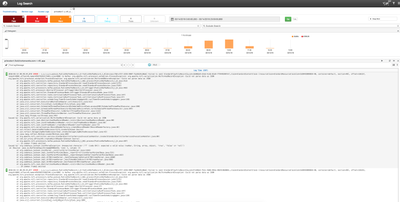
Log Search Helps You Find Errors

62920-logsearcherrors.png

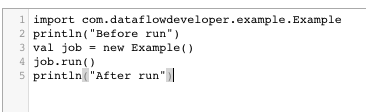
Run Code For Your Spark Class

62921-scalasparkrunnercode.png

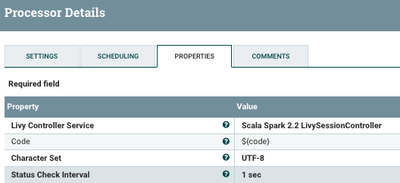
Setting up Your ExecuteSparkInteractive Processor

62922-sparklivyinteractive.png


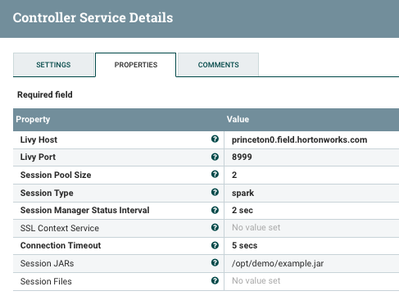
Setting Up Your Spark Service for Scala

62924-livysparkcontroller.png

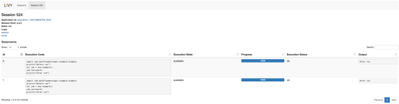
Tracking the Job in Livy UI

62925-livysessionforscala.png

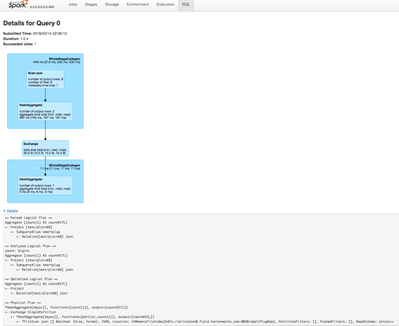
Tracking the Job in Spark UI

62926-scalasparkrun.png

I was looking at doing this: Pull code from Git and put into a NiFi attribute, run directly. For bigger projects, you will have many classes and dependencies that may require a full IDE and SBT build cycle. Once I build a Scala jar I want to run against that.

Example Code

package com.dataflowdeveloper.example
import org.apache.spark.sql.SparkSession
class Example () {
  def run( spark: SparkSession) {
      try {
        println("Started")
        val shdf = spark.read.json("hdfs://princeton0.field.hortonworks.com:8020/smartPlugRaw")
      shdf.printSchema()
      shdf.createOrReplaceTempView("smartplug")
      val stuffdf = spark.sql("SELECT * FROM smartplug")
      stuffdf.count()
        println("Complete.")
      } catch {
        case e: Exception =>
          e.printStackTrace();
      }
  }
}


=--- Run that with


import com.dataflowdeveloper.example.Example
println("Before run")
val job = new Example()
job.run(spark)
println("After run")


=== after run
{"text\/plain":"After run"}


Import Tip

You need to put your Jar in Session.jars on the Session control and on the same directory on hdfs.

So I did /opt/demo/example.jar in Linux and

hdfs:// /opt/demo/example.jar.

Make sure Livy and NiFi have read permissions on those.

Github: https://github.com/tspannhw/livysparkjob


Github Release: https://github.com/tspannhw/livysparkjob/releases/tag/v1.1


Apache NiFi Flow Example

spark-it-up-scala.xml

12,940 Views
Comments

Easy to run this code from Spark Shell as well without connection to nifi

runshell.sh

/usr/hdp/current/spark2-client/bin/spark-shell --packages org.apache.spark:spark-sql-kafka-0-10_2.11:2.2.0,org.apache.spark:spark-streaming-kafka-0-8_2.11:2.2.0 --jars /opt/demo/example.jar

https://docs.hortonworks.com/HDPDocuments/HDP2/HDP-2.6.4/bk_spark-component-guide/content/spark-data... http://spark.apache.org/docs/2.2.0/

http://spark.apache.org/docs/2.2.0/rdd-programming-guide.html

http://spark.apache.org/docs/2.2.0/quick-start.html

https://community.hortonworks.com/articles/151164/how-to-submit-spark-application-through-livy-rest....

curl -H "Content-Type: application/json" -H "X-Requested-By: admin" -X POST -d '{"file": "/apps/example.jar","className": "com.dataflowdeveloper.example.Links"}' http://server:8999/batches

curl -H "Content-Type: application/json" -H "X-Requested-By: admin" -X POST -d '{"file": "hdfs://server:8020/apps/example_2.11-1.0.jar","className": "com.dataflowdeveloper.example.Links"}' http://server:8999/batches

FYI

18/03/14 11:54:54 INFO LineBufferedStream: stdout: 18/03/14 11:54:54 INFO Client: Source and destination file systems are the same. Not copying hdfs://server:8020/opt/demo/example.jar