Our Community is getting an upgrade! To get everything ready for the relaunch, we’ll be placing the site in read-only mode starting September 21st.
We really appreciate your understanding while we get things set up behind the scenes. Catch up on all the exciting details about the move here.
Need help or have questions? Drop us a line at [email protected]

Community Articles

Find and share helpful community-sourced technical articles.
Announcements
Share your experience with Cloudera on G2 and get a $25 Amazon Gift card.
Hi, I'm CLEO! Something exciting is coming to the Community. Stay Tuned!

avatar
Contributor

Introduction

This post explains the process of submitting Spark jobs on CDP Public Cloud Data Hub to the Livy server and provides a sample wrapper script for job submission. To understand the Livy Spark submit process, please refer to this post and understand how to arrive at the job configuration.

The following steps submit the Spark Pi job from the spark_examples*.jar on S3.

Steps

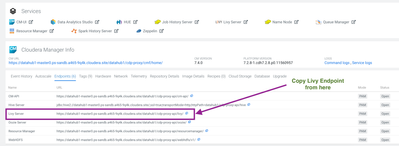
  1. Get the Livy endpoint for Data hub from the CDP control plane
    livy.png
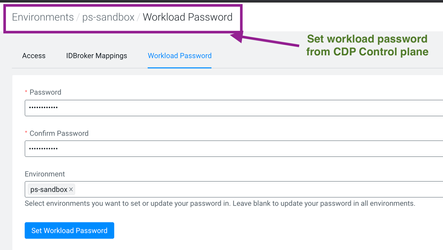
  2. Ensure that you have the workload password set for the environment
    workload-password.png
  3. Download the Python wrapper script using the following command:
    wget https://raw.githubusercontent.com/karthikeyanvijay/cdp-publiccloud/master/datahub-scripts/livy-cdp-spark-submit/cdp_spark_submit.py
  4. Edit the script to modify the Livy endpoint, workload username, and password
  5. Copy the spark sample jar to the S3
    hdfs dfs -cp /opt/cloudera/parcels/CDH-7.2.7-1.cdh7.2.7.p6.11615609/lib/spark/examples/jars/spark-examples_2.11-2.4.5.7.2.7.6-2.jar \
    s3a://vkarthikeyan/
  6.  Create a sample job configuration file as follows with the name jobconf.json
    {
    "className":"org.apache.spark.examples.SparkPi",
    "args": [1000],
    "file":"s3a://vkarthikeyan/spark-examples_2.11-2.4.5.7.2.7.6-2.jar",
    "driverMemory": "2G",
    "driverCores": 1,
    "executorCores": 2,
    "executorMemory": "4G",
    "numExecutors": 3,
    "queue": "default"
    }
  7. Run the script
    ./cdp_spark_submit.py

Conclusion

The job should now be submitted to the Data Hub cluster. The wrapper script can also be used on the CDP Private Cloud Base where Livy is configured with Livy.

------------

Vijay Anand Karthikeyan

2,110 Views
Comments
avatar
Expert Contributor

hi @vkarthikeyan 

how to run the same test but with livy installed in the private cdp, with kerberos and tls enabled?

Version history
Last update:
‎04-21-2026 02:05 AM
Updated by: