Our Community is getting an upgrade! To get everything ready for the relaunch, we’ll be placing the site in read-only mode starting September 21st.
We really appreciate your understanding while we get things set up behind the scenes. Catch up on all the exciting details about the move here.
Need help or have questions? Drop us a line at [email protected]
Created on
02-15-2017
07:29 AM
- edited on
04-21-2026
05:25 AM
by
GrazittiAPI
Introduction
Recently a customer asked me how to change destination of a connection which still contains data, but the destination is stopped. Using NiFi REST Api we can change the flow, here in this article I am trying to capture steps to update destination of a connection using REST API. The requirement around this was to push incoming data to different flows on a timely manner.
Prerequisites
1) To test this, Make sure HDF-2.x version of NiFi is up an running
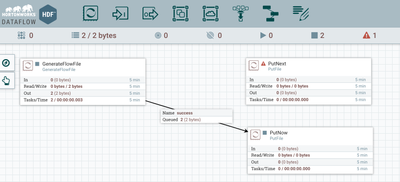
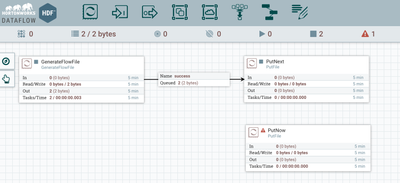
2) Minimum 3 processors are on the canvas with connection like below:
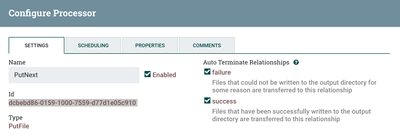
3) Note the destination's uuid [In my case 'PutNext' processor's uuid]
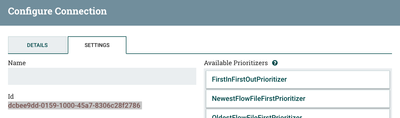
4) Note the uuid of the connection that has to be made to the 'PutNext' processor
'GET'ing the details of connection
1) Execute the below command on your terminal with uuid of the connection:
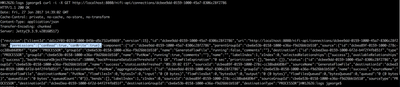
curl -i -X GET http://localhost:8080/nifi-api/connections/dcbee9dd-0159-1000-45a7-8306c28f2786
2) Now Copy the result of the GET curl command and update the below section with uuid of the 'PutNext' processor.
"destination":{"id":
"destinationId":"
"destinationId":3) Remove the below json element from the copied result:
"permissions":{"canRead":true,"canWrite":true},Updating Destination with PUT REST calls
1) Once updated, run the PUT REST API call from command line using curl as below:
curl -i -X PUT -H 'Content-Type: application/json' -d '{ **MY UPDATED JSON**}' http://localhost:8080/nifi-api/connections/dcbee9dd-0159-1000-45a7-8306c28f2786My Sample command is as below:
curl -i -X PUT -H 'Content-Type: application/json' -d '{
"revision": {
"clientId": "dd1c2f03-0159-1000-845b-d5c732a49869",
"version": 15
},
"id": "dcbee9dd-0159-1000-45a7-8306c28f2786",
"uri": "http://localhost:8080/nifi-api/connections/dcbee9dd-0159-1000-45a7-8306c28f2786",
"component": {
"id": "dcbee9dd-0159-1000-45a7-8306c28f2786",
"parentGroupId": "cbe6e53b-0158-1000-e36a-f9d26bb1b510",
"source": {
"id": "dcbea89f-0159-1000-278c-cc38bab689bf",
"type": "PROCESSOR",
"groupId": "cbe6e53b-0158-1000-e36a-f9d26bb1b510",
"name": "GenerateFlowFile",
"running": false,
"comments": ""
},
"destination": {
"id": "dcbebd86-0159-1000-7559-d77d1e05c910",
"type": "PROCESSOR",
"groupId": "cbe6e53b-0158-1000-e36a-f9d26bb1b510",
"name": "PutFile",
"running": false,
"comments": ""
},
"name": "",
"labelIndex": 1,
"zIndex": 0,
"selectedRelationships": ["success"],
"availableRelationships": ["success"],
"backPressureObjectThreshold": 10000,
"backPressureDataSizeThreshold": "1 GB",
"flowFileExpiration": "0 sec",
"prioritizers": [],
"bends": []
},
"status": {
"id": "dcbee9dd-0159-1000-45a7-8306c28f2786",
"groupId": "cbe6e53b-0158-1000-e36a-f9d26bb1b510",
"name": "success",
"statsLastRefreshed": "09:02:22 EST",
"sourceId": "dcbea89f-0159-1000-278c-cc38bab689bf",
"sourceName": "GenerateFlowFile",
"destinationId": "dcbebd86-0159-1000-7559-d77d1e05c910",
"destinationName": "PutFile",
"aggregateSnapshot": {
"id": "dcbee9dd-0159-1000-45a7-8306c28f2786",
"groupId": "cbe6e53b-0158-1000-e36a-f9d26bb1b510",
"name": "success",
"sourceName": "GenerateFlowFile",
"destinationName": "PutFile",
"flowFilesIn": 0,
"bytesIn": 0,
"input": "0 (0 bytes)",
"flowFilesOut": 0,
"bytesOut": 0,
"output": "0 (0 bytes)",
"flowFilesQueued": 18,
"bytesQueued": 18,
"queued": "18 (18 bytes)",
"queuedSize": "18 bytes",
"queuedCount": "18"
}
},
"bends": [],
"labelIndex": 1,
"zIndex": 0,
"sourceId": "dcbea89f-0159-1000-278c-cc38bab689bf",
"sourceGroupId": "cbe6e53b-0158-1000-e36a-f9d26bb1b510",
"sourceType": "PROCESSOR",
"destinationId": "dcbebd86-0159-1000-7559-d77d1e05c910",
"destinationGroupId": "cbe6e53b-0158-1000-e36a-f9d26bb1b510",
"destinationType": "PROCESSOR"
}' http://localhost:8080/nifi-api/connections/dcbee9dd-0159-1000-45a7-8306c28f2786
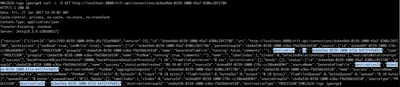
2) Once you execute the above, if the update is successful, you will get below result:
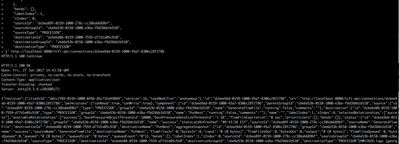
HTTP/1.1 200 OK Date: Fri, 27 Jan 2017 14:59:37 GMT Cache-Control: private, no-cache, no-store, no-transform Content-Type: application/json Transfer-Encoding: chunked Server: Jetty(9.3.9.v20160517)
Result will be similar as below:
3) Now login Back to the NiFi UI and make sure the change is done:
References:
Thanks,
Jobin George
Created on 05-13-2019 04:19 PM - edited 08-17-2019 02:32 PM
Hi Jobin,
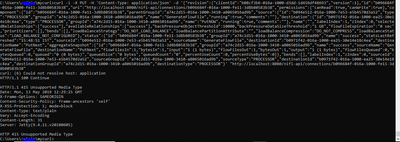
Thanks for the post.I am doing same exactly what you did but i am getting error
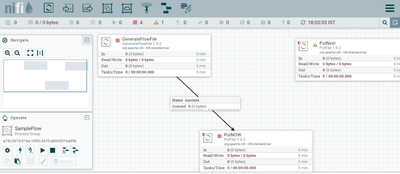
NIFI flows
Curl Command
*****Proccessors UUID*****
putNext UUID---->
b0971f42-016a-1000-ea25-30e14e18c4ea
generateflow UUID------>
b094e512-016a-1000-7e53-e5b4570d3a52
connection UUID---->
b096684f-016a-1000-fe11-3d8b80583b38
Note: I am doing this in windows PC locally.
Please help here
Created on 01-30-2020 02:53 AM
Thank you for the article.
In my case, we need to create a new connection between two process groups. Is the same curl changing parameters?
Thank you advanced.