
Support Questions
- Cloudera Community
- Support
- Support Questions
- Re: Joining tables by creating a view and querying...
- Subscribe to RSS Feed
- Mark Question as New
- Mark Question as Read
- Float this Question for Current User
- Bookmark
- Subscribe
- Mute
- Printer Friendly Page
- Subscribe to RSS Feed
- Mark Question as New
- Mark Question as Read
- Float this Question for Current User
- Bookmark
- Subscribe
- Mute
- Printer Friendly Page
Joining tables by creating a view and querying the view using querydatabasetable
- Labels:
-
Apache NiFi


Created 10-31-2017 08:34 PM
- Mark as New
- Bookmark
- Subscribe
- Mute
- Subscribe to RSS Feed
- Permalink
- Report Inappropriate Content
Hi All,
Thanks a lot this awesome community.
I read tha JOIN queries are not possible in NiFi,
https://community.hortonworks.com/questions/64667/joining-tables-within-nifi.html
so I thought of a workaround by creating a view in the database and then queriyng the view
so I will be using tablename as the view name in the properties of querydatabasetable, I do not have a sample database, is this something which can be done?
Thanks


Created on 11-01-2017 01:51 AM - edited 08-18-2019 01:09 AM
- Mark as New
- Bookmark
- Subscribe
- Mute
- Subscribe to RSS Feed
- Permalink
- Report Inappropriate Content
- Yes you can use the view name as table name in query database table processor and it's better to have Maximum-value column(s) then this processor will pull only the new records that got added (or) modified.
- if we don't have any max value columns mentioned in configurations then processor will keep track of all columns, which could have performance impact.
- You can view the state of the processor by Right clicking and click on view state button, if you want to clear the state then click on clear state at right corner.
Query database table Configs:-
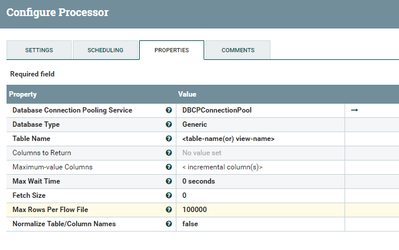
I have changed Max Rows Per Flow File as 100K,so the processor will fetches 100K records per file (or) you can leave that as 0(default) will give you all the records in 1 Flow File.
Connection pool Configs:-
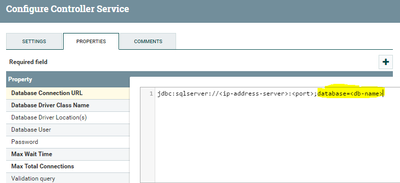
above screenshot connection pool is an example for sql server as you can see the highlighted text, if you don't mention any database in the connection URL then it will connects to default database in source.
jdbc:sqlserver://<ip-address-server>:<port> //this connection string we won't mentioned database name so it connects to default database in sql server.
Created 11-01-2017 12:51 AM
- Mark as New
- Bookmark
- Subscribe
- Mute
- Subscribe to RSS Feed
- Permalink
- Report Inappropriate Content
Thanks a lot for confirming, appreciate it.
Created on 11-01-2017 01:51 AM - edited 08-18-2019 01:09 AM
- Mark as New
- Bookmark
- Subscribe
- Mute
- Subscribe to RSS Feed
- Permalink
- Report Inappropriate Content
- Yes you can use the view name as table name in query database table processor and it's better to have Maximum-value column(s) then this processor will pull only the new records that got added (or) modified.
- if we don't have any max value columns mentioned in configurations then processor will keep track of all columns, which could have performance impact.
- You can view the state of the processor by Right clicking and click on view state button, if you want to clear the state then click on clear state at right corner.
Query database table Configs:-
I have changed Max Rows Per Flow File as 100K,so the processor will fetches 100K records per file (or) you can leave that as 0(default) will give you all the records in 1 Flow File.
Connection pool Configs:-
above screenshot connection pool is an example for sql server as you can see the highlighted text, if you don't mention any database in the connection URL then it will connects to default database in source.
jdbc:sqlserver://<ip-address-server>:<port> //this connection string we won't mentioned database name so it connects to default database in sql server.
Created 11-01-2017 04:01 PM
- Mark as New
- Bookmark
- Subscribe
- Mute
- Subscribe to RSS Feed
- Permalink
- Report Inappropriate Content
@Shu Appreciate your help This is as clear an explanation as it can get Thanks again


