
Our Community is getting an upgrade! To get everything ready for the relaunch, we’ll be placing the site in read-only mode starting September 21st.
We really appreciate your understanding while we get things set up behind the scenes. Catch up on all the exciting details about the move here.
Need help or have questions? Drop us a line at [email protected]

Support Questions
 Hi, I'm CLEO! Something exciting is coming to the Community. Stay Tuned!
- Cloudera Community
- Support
- Support Questions
- add grid datanode
- Subscribe to RSS Feed
- Mark Question as New
- Mark Question as Read
- Float this Question for Current User
- Bookmark
- Subscribe
- Mute
- Printer Friendly Page
- Subscribe to RSS Feed
- Mark Question as New
- Mark Question as Read
- Float this Question for Current User
- Bookmark
- Subscribe
- Mute
- Printer Friendly Page
add grid datanode
- Labels:
-
HDFS


Created on
01-27-2020
12:14 PM
- last edited on
01-27-2020
01:27 PM
by
 cjervis

- Mark as New
- Bookmark
- Subscribe
- Mute
- Subscribe to RSS Feed
- Permalink
- Report Inappropriate Content
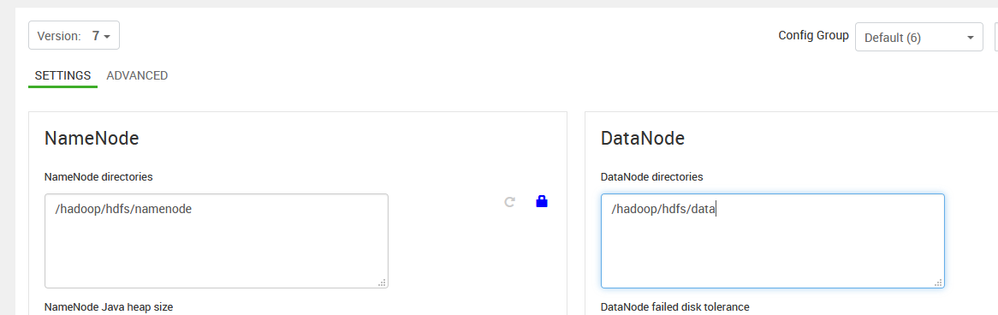
- /grid/1/
- /grid/2/
- /grid/3/
- /grid/4/
- /grid/5/
Attached image where I don't know how to add those routes if someone can help me.
Greetings


Created 01-28-2020 11:52 PM
- Mark as New
- Bookmark
- Subscribe
- Mute
- Subscribe to RSS Feed
- Permalink
- Report Inappropriate Content
It depends what you want to change:
If you want just to add additional disks in all nodes follow this:
Best way to create partitions like /grid/0/hadoop/hdfs/data - /grid/10/hadoop/hdfs/data and mount them to new formatted disks (its one of recommendation parameters for hdfs data mounts but you can change it):
/dev/sda1 /grid/0 ext4 inode_readahead_blks=128,commit=30,data=writeback,noatime,nodiratime,nodev,nobarrier 0 0
/dev/sdb1 /grid/1 ext4 inode_readahead_blks=128,commit=30,data=writeback,noatime,nodiratime,nodev,nobarrier 0 0
/dev/sdc1 /grid/2 ext4 inode_readahead_blks=128,commit=30,data=writeback,noatime,nodiratime,nodev,nobarrier 0 0
After that just add all partitions paths in hdfs configs like:
/grid/0/hadoop/hdfs/data,/grid/1/hadoop/hdfs/data,/grid/2/hadoop/hdfs/data
But dont delete existed partition from configuration because you will lost data from block which stored in /hadoop/hdfs/data.
Path dont really matter just keep them separately and dont forget to make re-balance between disks.
Created 01-28-2020 04:00 AM
- Mark as New
- Bookmark
- Subscribe
- Mute
- Subscribe to RSS Feed
- Permalink
- Report Inappropriate Content
You need to prepare and mount disks before setting this configuration:
Datanode directores:
/hadoop/hdfs/data/grid/1/
/hadoop/hdfs/data/grid/2/
/hadoop/hdfs/data/grid/3/
/hadoop/hdfs/data/grid/4/
/hadoop/hdfs/data/grid/5/
Created 01-28-2020 09:02 PM
- Mark as New
- Bookmark
- Subscribe
- Mute
- Subscribe to RSS Feed
- Permalink
- Report Inappropriate Content
Thank you very much for the information @goga , now I have a doubt, I modified according to what you told me, but it gives me error I have to make a format to the hdfs¿? I ask because when it was installed it was made in /hadoop/hdfs/data/ and now I finish modifying it /hadoop/hdfs/data/grid/1 but when I try to raise in ambari it gives error.
Created 01-28-2020 09:59 PM
- Mark as New
- Bookmark
- Subscribe
- Mute
- Subscribe to RSS Feed
- Permalink
- Report Inappropriate Content
Its fresh installation or you want to change existed?
Created 01-28-2020 11:17 PM
- Mark as New
- Bookmark
- Subscribe
- Mute
- Subscribe to RSS Feed
- Permalink
- Report Inappropriate Content
Thanks for helping me @goga I explain you I have 2 environments, one of development where there is already an installation where the namenode has the path
Namenode
/hadoop/hdfs/namenode
Datanode
/hadoop/hdfs/data
and where I changed the new records
/hadoop/hdfs/data/grip1,/hadoop/hdfs/data2,etc. that's where I get error because when I try to modify it it doesn't start.
Then in the production environment which are 25 servers with the following structure
namenode
/hadoop/hdfs/namenode (2 1TB hard drives in raid 10)
/hadoop/hdfs/data/grip1/namenode
datanode
/hadoop/hdfs/data/grip1- /hadoop/hdfs/data/grip10 (10 hard drives with 2TB)
I don't know if you see my production distribution and development as correctly as I do. Thanks for the help.
Created 01-28-2020 11:52 PM
- Mark as New
- Bookmark
- Subscribe
- Mute
- Subscribe to RSS Feed
- Permalink
- Report Inappropriate Content
It depends what you want to change:
If you want just to add additional disks in all nodes follow this:
Best way to create partitions like /grid/0/hadoop/hdfs/data - /grid/10/hadoop/hdfs/data and mount them to new formatted disks (its one of recommendation parameters for hdfs data mounts but you can change it):
/dev/sda1 /grid/0 ext4 inode_readahead_blks=128,commit=30,data=writeback,noatime,nodiratime,nodev,nobarrier 0 0
/dev/sdb1 /grid/1 ext4 inode_readahead_blks=128,commit=30,data=writeback,noatime,nodiratime,nodev,nobarrier 0 0
/dev/sdc1 /grid/2 ext4 inode_readahead_blks=128,commit=30,data=writeback,noatime,nodiratime,nodev,nobarrier 0 0
After that just add all partitions paths in hdfs configs like:
/grid/0/hadoop/hdfs/data,/grid/1/hadoop/hdfs/data,/grid/2/hadoop/hdfs/data
But dont delete existed partition from configuration because you will lost data from block which stored in /hadoop/hdfs/data.
Path dont really matter just keep them separately and dont forget to make re-balance between disks.


