Our Community is getting an upgrade! To get everything ready for the relaunch, we’ll be placing the site in read-only mode starting September 21st.
We really appreciate your understanding while we get things set up behind the scenes. Catch up on all the exciting details about the move here.
Need help or have questions? Drop us a line at [email protected]

Support Questions

Find answers, ask questions, and share your expertise
Announcements
Share your experience with Cloudera on G2 and get a $25 Amazon Gift card.
Hi, I'm CLEO! Something exciting is coming to the Community. Stay Tuned!

How to capture number 0 in RouteOnAttribute

avatar
Reader

Hi,


I have a requirement where-in I have to take a count(*) using selecthiveQL and if count is 0 then I have to insert a row. 

My flow is selectHive QL → RouteOnAttribute where in I am trying to capture the 0 

Json is as below:

[ {
"_c0" : 0
} ]

can some one please tell me how to capture this zero, I tried multiple ways but not able to. 

Also if anyone has better solution pls let me know. This is quite urgent. 

1 ACCEPTED SOLUTION

avatar
Master Mentor

@vamcits 


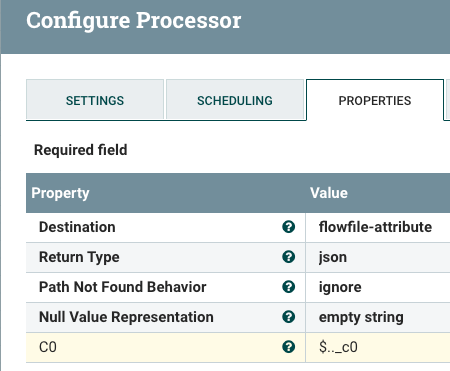
You can use EvaluateJsonPath processor to extract the 0 from the json you shared


Screen Shot 2019-11-12 at 12.29.46 PM.png

You can name the custom property added above to whatever you like (I just used C0).
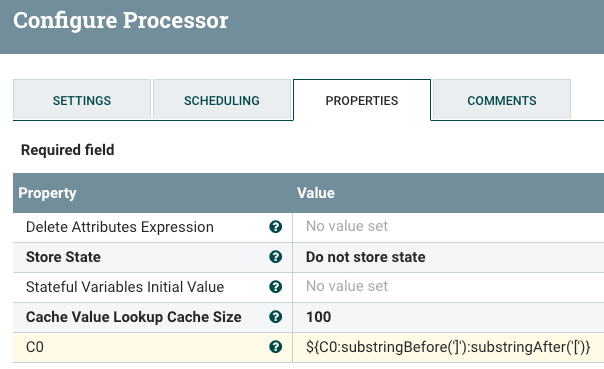
This will result in a "C0" attribute being generated on the FlowFile with a value of "[0]".

If you don't wan the square brackets around the number, you can remove them using an updateAttribute processor as follows:

Screen Shot 2019-11-12 at 12.34.09 PM.png

Then you can perform your routing with the RouteOnAttribute processor.


Hope this helps,
Matt


View solution in original post

1 REPLY 1

avatar
Master Mentor

@vamcits 


You can use EvaluateJsonPath processor to extract the 0 from the json you shared


Screen Shot 2019-11-12 at 12.29.46 PM.png

You can name the custom property added above to whatever you like (I just used C0).
This will result in a "C0" attribute being generated on the FlowFile with a value of "[0]".

If you don't wan the square brackets around the number, you can remove them using an updateAttribute processor as follows:

Screen Shot 2019-11-12 at 12.34.09 PM.png

Then you can perform your routing with the RouteOnAttribute processor.


Hope this helps,
Matt