Our Community is getting an upgrade! To get everything ready for the relaunch, we’ll be placing the site in read-only mode starting September 21st.
We really appreciate your understanding while we get things set up behind the scenes. Catch up on all the exciting details about the move here.
Need help or have questions? Drop us a line at [email protected]

Community Articles

Find and share helpful community-sourced technical articles.
Announcements
Share your experience with Cloudera on G2 and get a $25 Amazon Gift card.
Hi, I'm CLEO! Something exciting is coming to the Community. Stay Tuned!

Labels (1)
avatar
Rising Star

CDP has recently been introduced to the market, and we all want to learn about it, so I decided to contribute a bit.


In this series of tutorials, I want to explain the basics of CDP Data Hub and provide some ease of automation. Indeed, the CDP control plane user interface provides a thorough workflow that automates the creation of main elements that ensures security, governance and scalability.


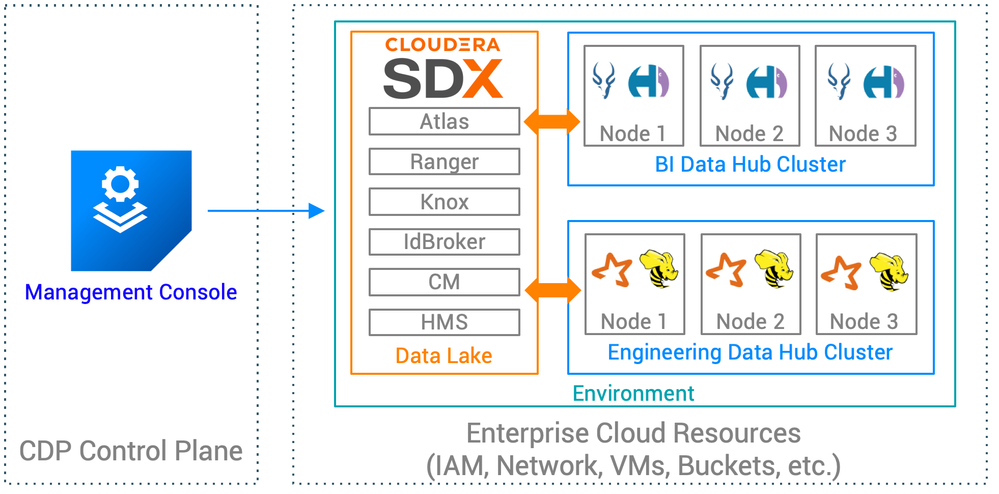
Screen Shot 2019-11-14 at 11.00.19 AM.png


As depicted above, these main elements are:

  • CDP Environment: Cloud hosted (in your cloud) resources for CDP deployment
  • CDP Data Lake: Host of CDP SDX, the shared service layer providing all security and governance
  • CDP Data Hub cluster(s): where users run their workloads

Note: CDP offers a lot more than these basic elements, and a lot more ways to configure them; this is a 101 tutorial and will not address all that CDP has to offer. For more information, visit the CDP documentation or product page.


Instead, this tutorial series will teach you:

  1. How to create a CDP environment in AWS with minimal requirements
  2. How to create a datalake from an existing environment
  3. How to launch a CDP Data Hub cluster via CLI


Happy scripting!

5,555 Views